the GUI we didn't build
getting people to upgrade their macs has been on my bucket list for years.
not in a “i’d love to see the northern lights” way. in a “this is the single most effective troubleshooting step we have, and yet” way. updates land in the top two or three things i reach for when something’s acting weird. they patch the security holes. they bring the new features. they keep everyone on the same page.
and yet. getting people to actually do them. that’s the thing.
for years, the tools didn’t really exist on the Apple side. there was no native mechanism for nudging an upgrade, no built-in deadline, no friendly notification that mac admins could lean on. so well-meaning engineers built their own. update GUIs, status bar widgets, popups, wizards. real solutions to a real problem, with no native option to reach for. credit where it’s due.
but i could never shake the feeling that the GUI itself wasn’t the answer. these tools always struck me as either too intrusive (popups, blockers, modals stacked on modals) or too unfamiliar (custom UIs that looked out of place no matter how much org branding you sprinkled on them). i kept coming back to the same instinct: the GUI was rarely the part that moved the needle. the message around it was.
i’d even started sketching out a feedback mechanism. “what’s holding you back from upgrading?” that kind of thing. trying to understand the resistance. trying to reduce the friction. trying to do it human-first, and let what people told me shape what came next: how the GUI would look, how it would behave, when it would show up.
turns out Apple was already on it. we were just waiting for macOS to catch up.
Declarative Device Management (DDM) gave us a way to test that instinct. the moment we did, the resemblance to iOS was unmistakable. we were still putting a GUI in front of people. just one they already knew, from the device in their pocket.
so. what if we just used that?
seeing what’s there
before we could nudge anything, we needed to see what we were nudging.
we use Fleet for device management, and we use Observe for, well, observing things. Observe is an observability platform that’s good at the messy middle: ingesting events from a bunch of different places, shaping them into something queryable, and letting you build dashboards that hold up when your data shape changes. for a team that’s increasingly thinking about devices the way it thinks about services, that’s the right shape of tool.
the goal was simple: pipe Fleet’s scheduled query results into Observe so we could chart macOS versions across the fleet over time. once we could see the shape of the problem, we could measure the shape of any solution.
because we’re on Fleet’s cloud-hosted offering, getting a log destination wired up required a hand from Fleet support. self-hosted Fleet users have an easier time here: you set up your own endpoint and point Fleet at it. for cloud-hosted, support sets up a dedicated destination for you. ours was configured in less than a day. no complaints.
once the data was flowing, scheduled queries started showing up in Observe on a regular cadence. macOS versions, broken down by host, trending over time. exactly what we needed.
using Apple’s words
with the dashboard in place, we turned to the actual nudge.
Fleet has a built-in feature for this: enforcing OS updates with a minimum version and a deadline. under the hood, this leans on Apple’s DDM to schedule the upgrade on the device itself.
we set the minimum macOS version. we set a deadline. we ticked the “update new hosts to latest” box. we hit save.
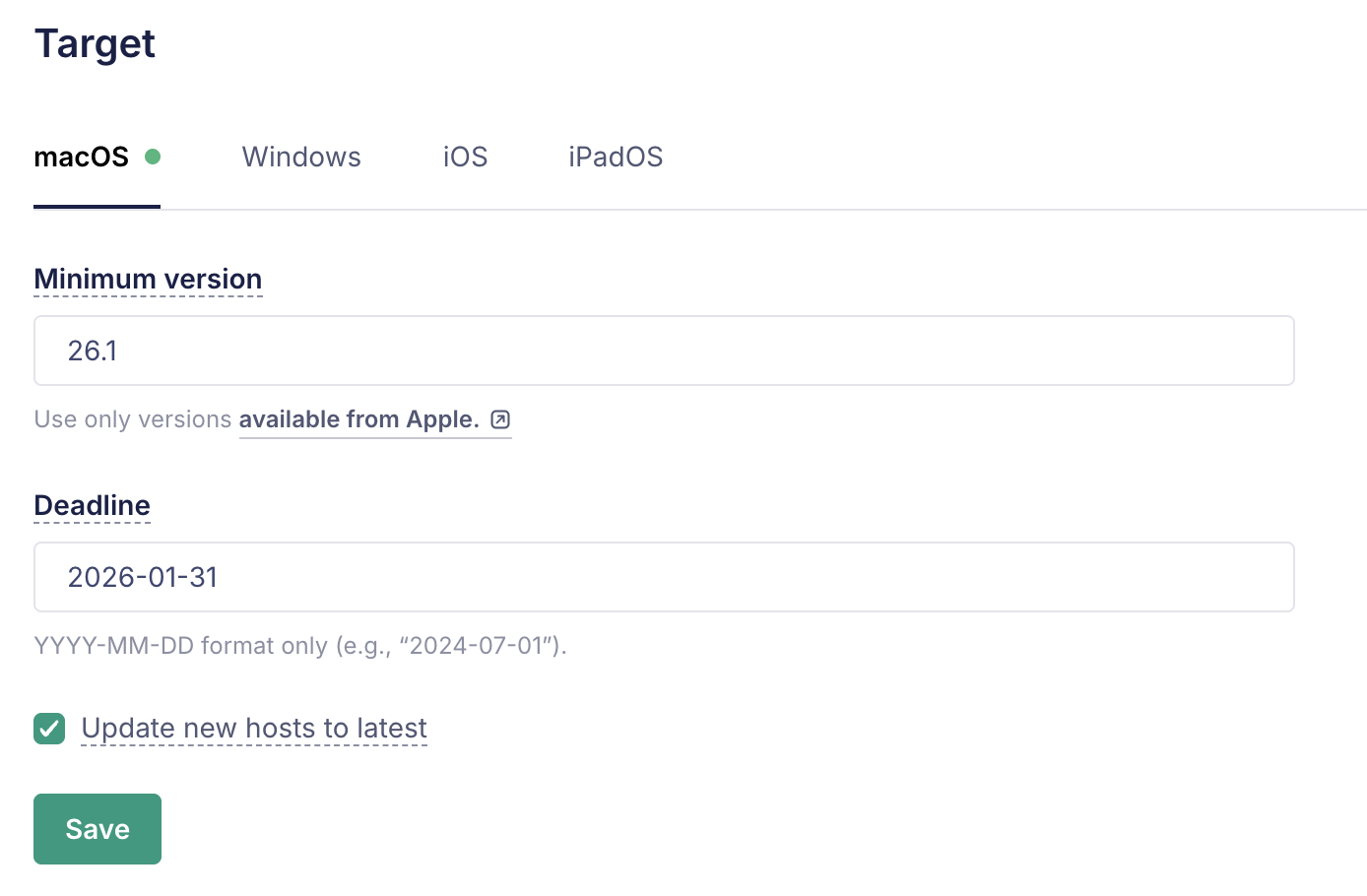
start date: december 1st. deadline: january 31st. two months of runway, with the holidays smack in the middle. plenty of room for people to update on whatever schedule fit their lives.
the magic is what happens on the device. once the policy is in place, macOS itself starts surfacing a notification once a day. it’s not a custom UI. it’s not a tool we built. it’s the same notification flow people already know from their iPhones and iPads. familiar. expected. easy to act on.
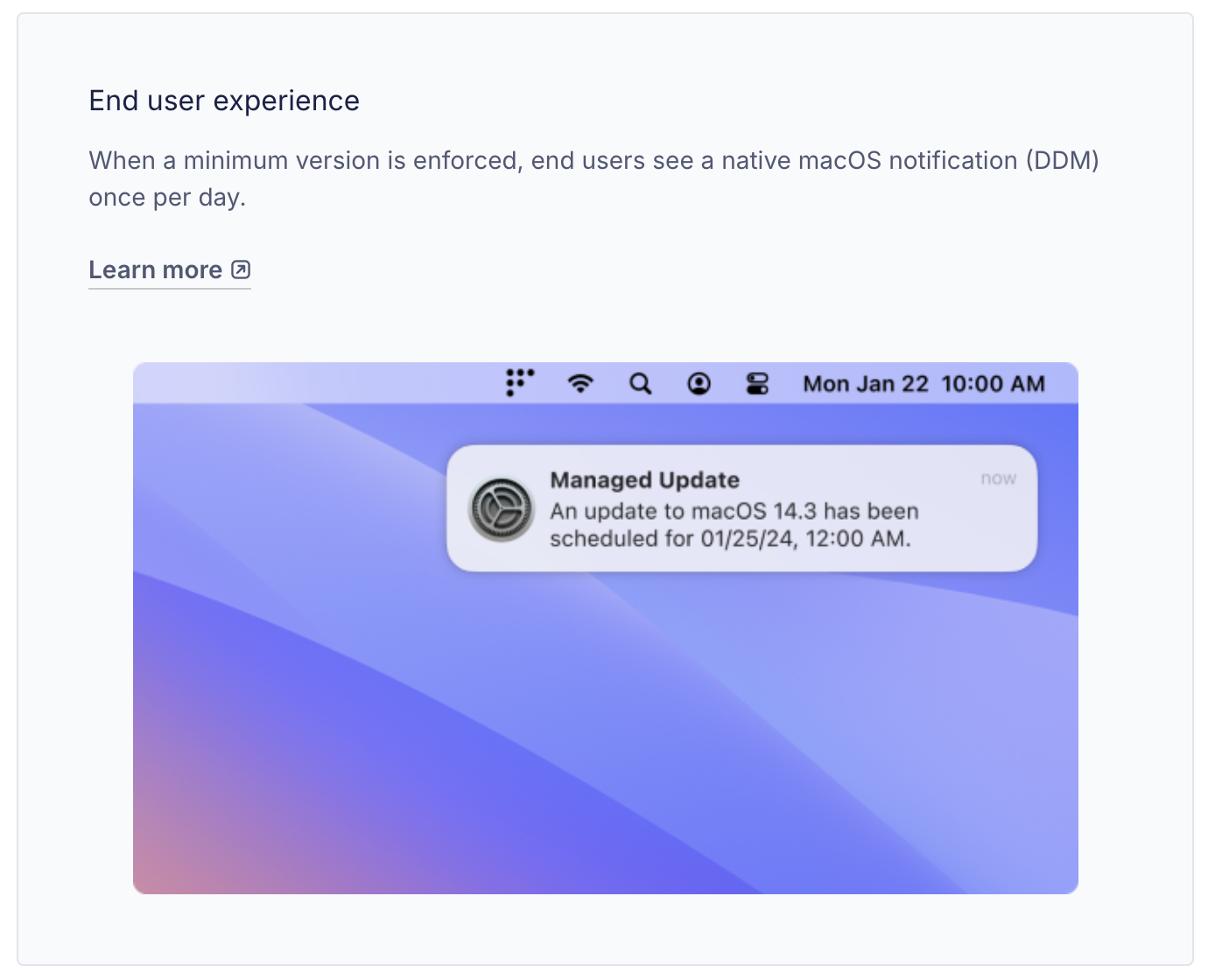
users could schedule the update for whenever made sense for them. 2am on a tuesday. lunchtime. tonight after work. they were in control of the timing. Apple handled the nudging.
and on the deadline date, if a device hadn’t updated, the system would handle that too. no negotiation. no extra tooling. just the OS doing what we asked it to do.
the Slack message
before any of this kicked in, i sent everyone a heads up.
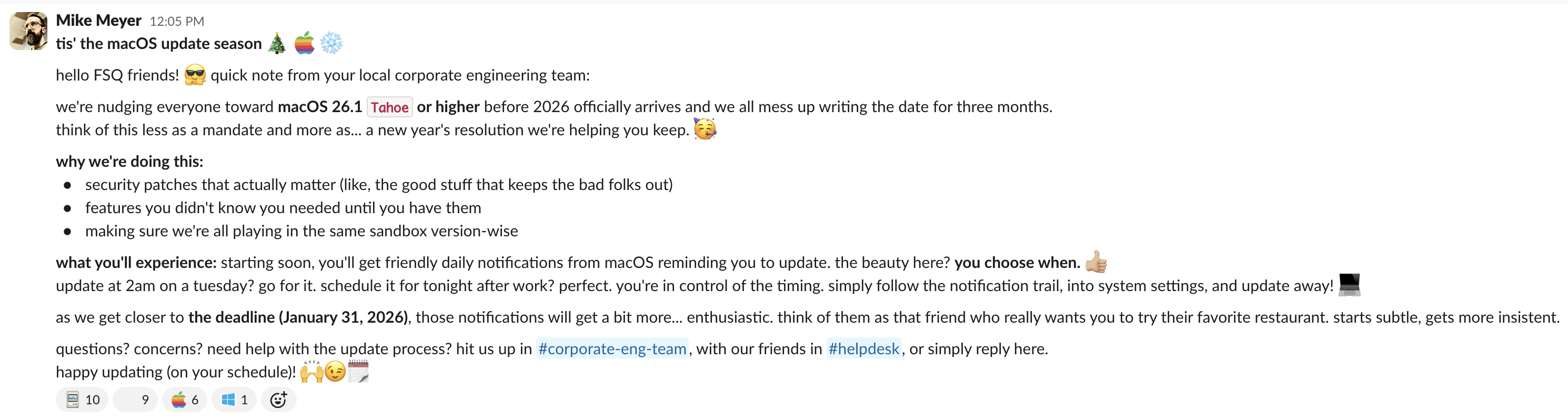
i wanted people to know what was coming, why we were doing it, and how much control they had over the process. the policy would speak for itself once it started, but a heads-up costs nothing and earns a lot of goodwill.
a few reactions later, we were live.
the first seven days
then i watched the chart.
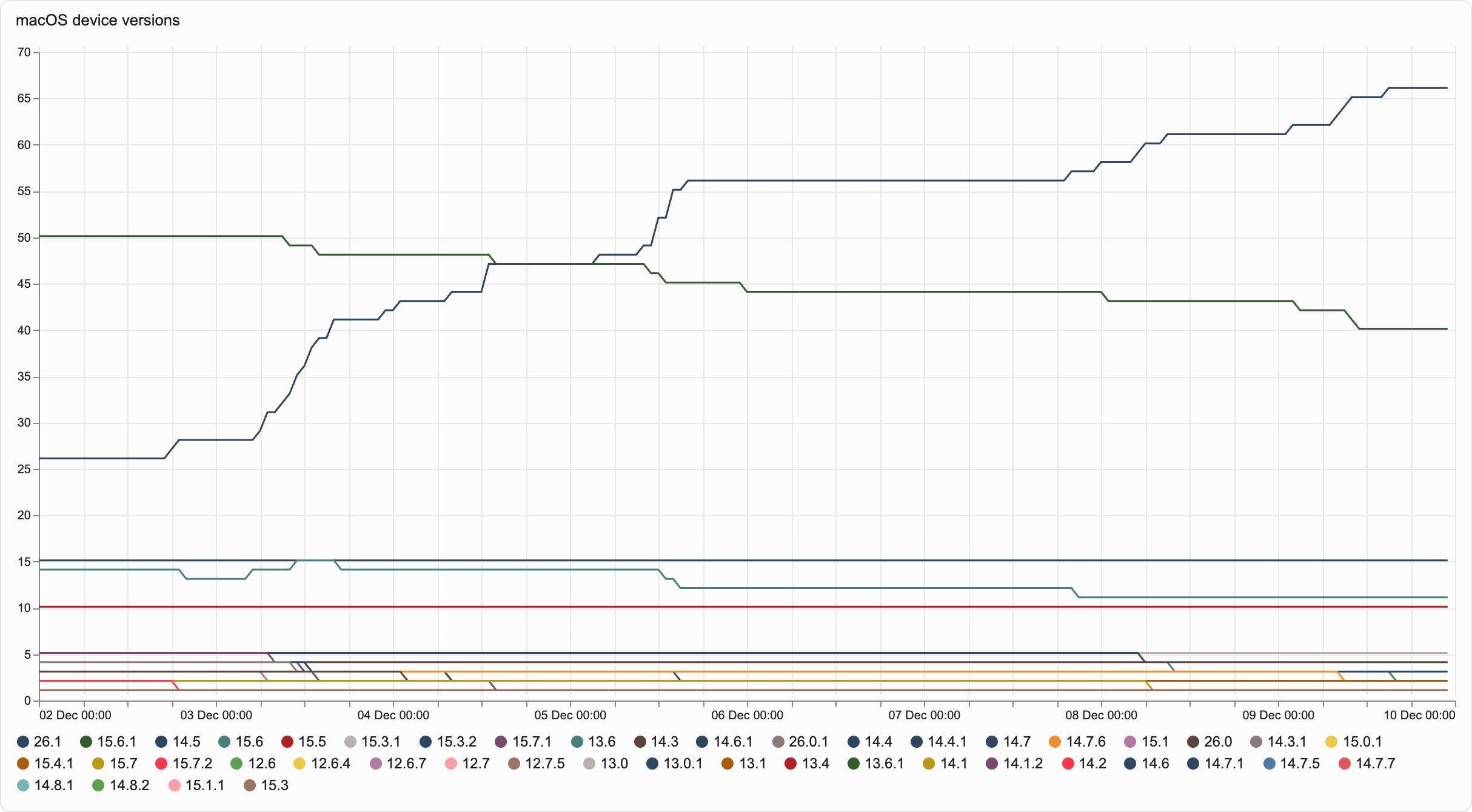
the version we were nudging climbed steadily. older versions shed hosts. nobody opened a ticket. nobody asked what the weird popup was. nobody needed a meeting about it.
it just worked.
why Apple’s GUI wins
here’s what i think about, every time i see this chart.
for years, the answer to “how do we get users to upgrade” has been some flavor of: build a thing. an app. a popup. a status bar widget. a wizard. a notification framework with retries and snooze logic and a feedback prompt and an admin override and. and. and.
and every one of those things, no matter how well built, has the same problem: it’s not the OS.
the OS already knows how to ask. it already has a notification UI people recognize. it already has a deadline mechanism. it already has the install flow built in. all we had to do was tell it what we wanted.
DDM works for two distinct reasons.
first, the notification is Apple native. it mirrors the iOS and iPadOS flows so closely that recognizability becomes instant. your users have already been trained on this UI by Apple, every day, on the device in their pocket. there’s no learning curve. no branding required. no “what app is this?” hesitation.
second, it solves the “by when” problem. the deadline is enforced by Apple’s own protocols. miss the date, the update applies. blunt? maybe. but with a deadline this generous, non-action having consequences feels less like punishment and more like, well, parenting. use your words. then mean what you said.
two months later
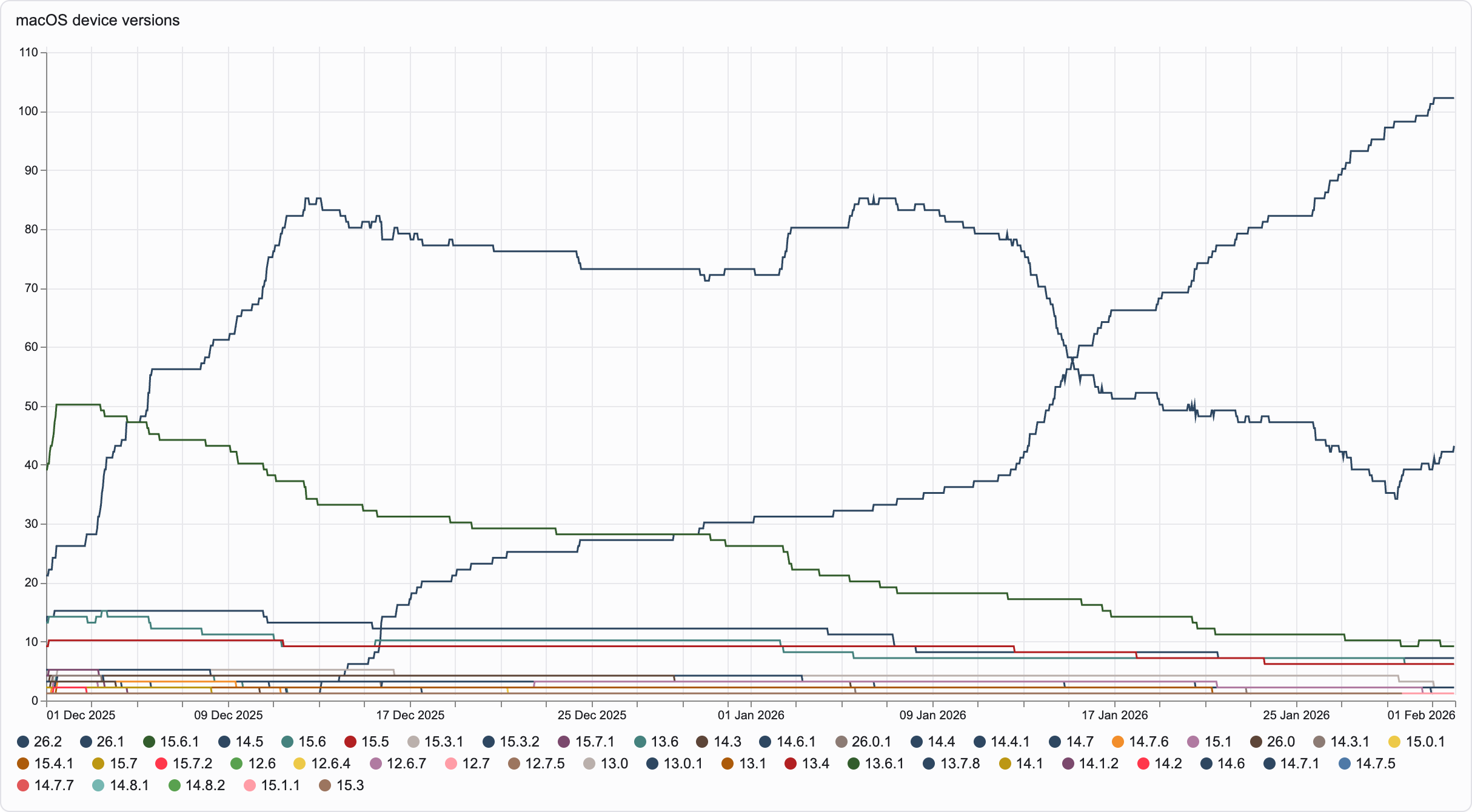
the chart above is the whole arc. you can see the deadline land. you can see the resistance fade. you can see the policy work.
look closer. partway through, Apple released a newer version than the one we’d set as the floor. you can see it creep in. you can see it climb. nobody asked people to take it. they took it anyway.
we’re in a steady state now. our team only needs to update the minimum version setting on a cadence. once a quarter feels about right. set it, ship it, move on.
the bucket list item is checked.