going with the flow
let me set the scene.
it was late 2024. our team had just made the decision to move our entire mac fleet from Jamf Pro to Fleet. renewal was coming up. we didn’t want to renew. this was fine.
the timeline we gave ourselves: 9 days.
the migration backstory is here. what i want to talk about is the engine underneath it: the Okta Workflows system that made the whole thing run itself.
why okta workflows, though?
fair question. Okta Workflows is, on paper, an identity automation platform. it’s not marketed as “the thing you use to migrate your MDM.” there’s no Fleet connector in the Okta Integration Network. and yet, here we are.
the answer was practical: we were already using it. our team had been building no-code automations in Workflows for a while, so when we needed to spin something up fast, it was the obvious choice. the no-code environment meant we could prototype quickly, and the Workflows Tables feature gave us a real-time data store we could read and write to without rate limiting headaches.
when you’re staring down a 9-day deadline, you don’t go looking for the best tool. you reach for the one you already trust.
what employees experienced
before i pull back the curtain, i want to revisit what this looked like from the other side, because the whole point of building something this complicated was so that employees didn’t have to think about it.
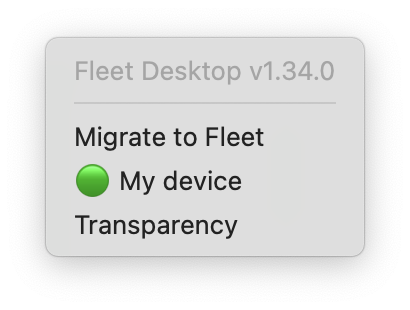
it started with a company-wide Slack message from me laying out what was coming and when. on migration day, employees just had to look for the “migrate to Fleet” option in their Fleet Desktop menu bar icon and click “start.”
about 45 to 90 seconds later, Apple’s native remote management screen appeared. they clicked “enroll,” entered their computer password, got a green checkmark, and clicked “quit.”
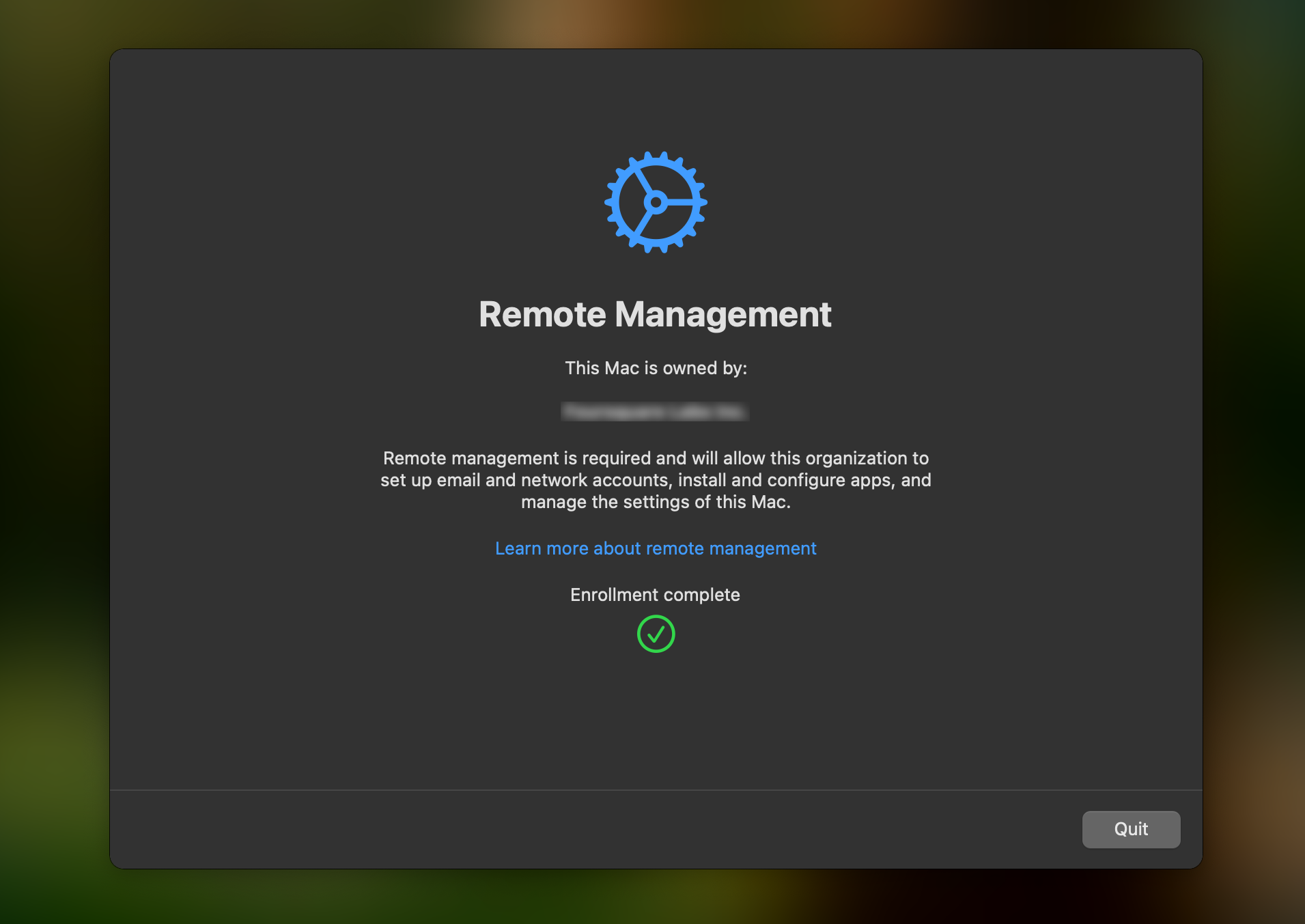
start to finish: under 5 minutes.
since we ran this migration, Apple has introduced native MDM migration support that makes this employee-facing step even smoother, including the ability to enforce migration with a deadline if users don’t act. that’s a genuinely nice improvement. but it doesn’t change what’s happening underneath. the state tracking, the cleanup, the self-healing, the Slack updates: none of that comes from Apple. that’s still on you to build. which is exactly what we did.
the architecture: one table to rule them all
the heart of the whole system was a single Okta Workflows Table. for some of our previous automations we’d experimented with other data stores and had run into enough friction to know we wanted something native to the tool we were already building in. Workflows Tables were the right call: fast, reliable, and no auth headaches. since this migration was largely an internal operation, we didn’t have a pressing need to surface the data anywhere else, so keeping it inside Okta Workflows was a non-issue.
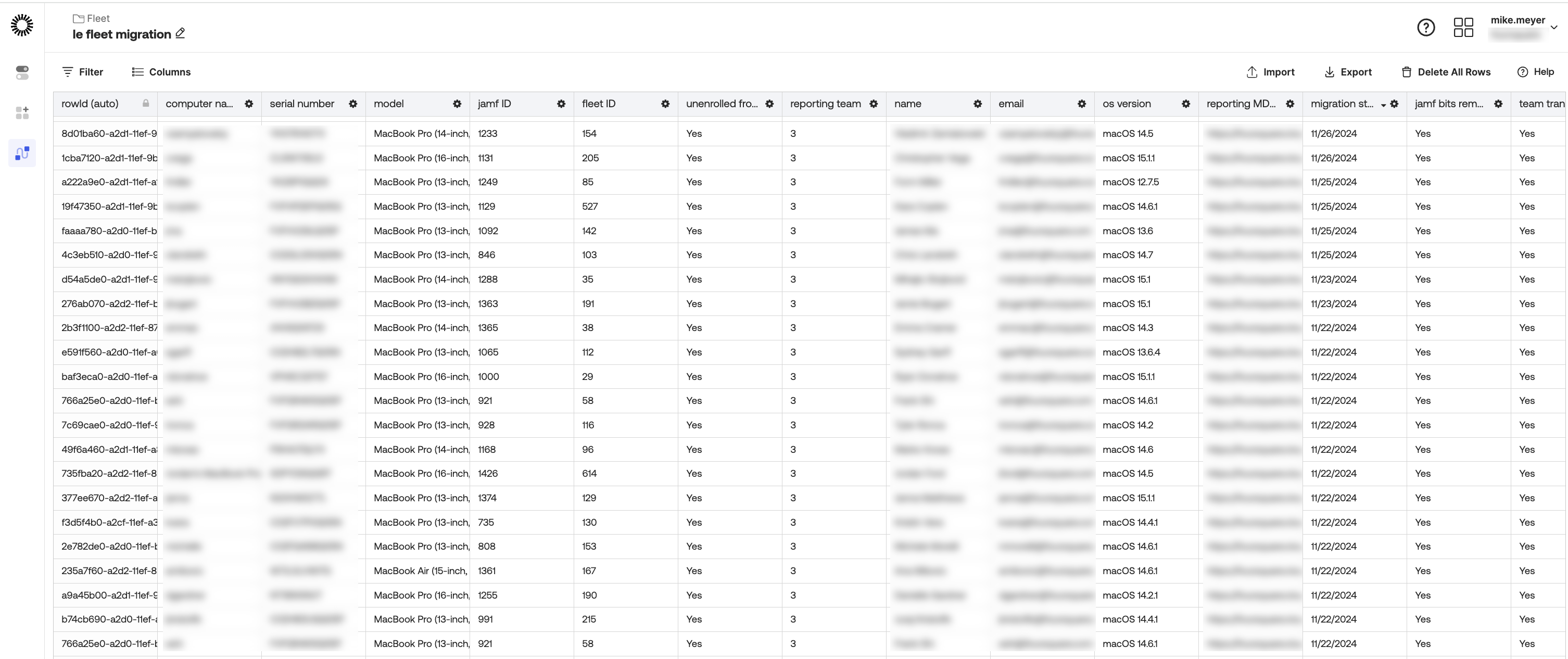
each row represented a device. and the table ended up being more than just a migration scoreboard; it doubled as a live device inventory. the data wasn’t all collected at once. it was populated and updated on a cadence as each flow ran and conditions were met. by the time a device was fully migrated, a row would contain:
device_model: what kind of mac it wasmacos_version: what OS it was runningassigned_user+email: who owned itfleet_url: its home in Fleetfilevault_status: encrypted? good.enrollment_type: automatic or manual- and a series of migration state columns, each one acting as a gate for the next flow in the chain
that last point is key. every flow evaluated specific column values before deciding whether to act. a device didn’t move forward until the table said it was ready. the whole system was essentially a state machine, with the table as the source of truth.
the individual flows will make more sense with one more concept in your back pocket: helper flows. in Okta Workflows, a helper flow is a child flow that a parent flow can call to process items one at a time. since we were dealing with a table full of devices, not a single record, helper flows were what made it possible to loop through rows and apply logic to each device individually, in sequence. if there’s one thing my team and i keep coming back to across all of our Workflows builds, it’s this: helper flows show up everywhere. they’re less of a nice-to-have and more of a key ingredient worth understanding early.
the flows
we built seven flows in total. with the exception of the host inventory collector, which ran on its own cadence throughout the day, these flows were designed to run in sequence during a targeted window each night. each one set up the conditions for the next.
migration trigger
this was the entry point. when an employee clicked “migrate to Fleet” in the Fleet Desktop UI, it fired a webhook that hit this flow. the flow queued the MDM unenrollment in Jamf and returned a 201 confirming the unenroll was in the queue (note: queued, not necessarily executed yet). it then wrote to the table and posted a Slack notification so we could watch progress in real time.
enrollment watcher
Fleet’s activity log routes all activity through a single webhook. this flow sat on that webhook and used branching logic to filter specifically for events where type = mdm_enrolled; anything else was ignored. when it found a match, it looked up the device by serial number in Fleet to get its Fleet ID, found the right row in the table, and marked it enrolled. another Slack update fired.
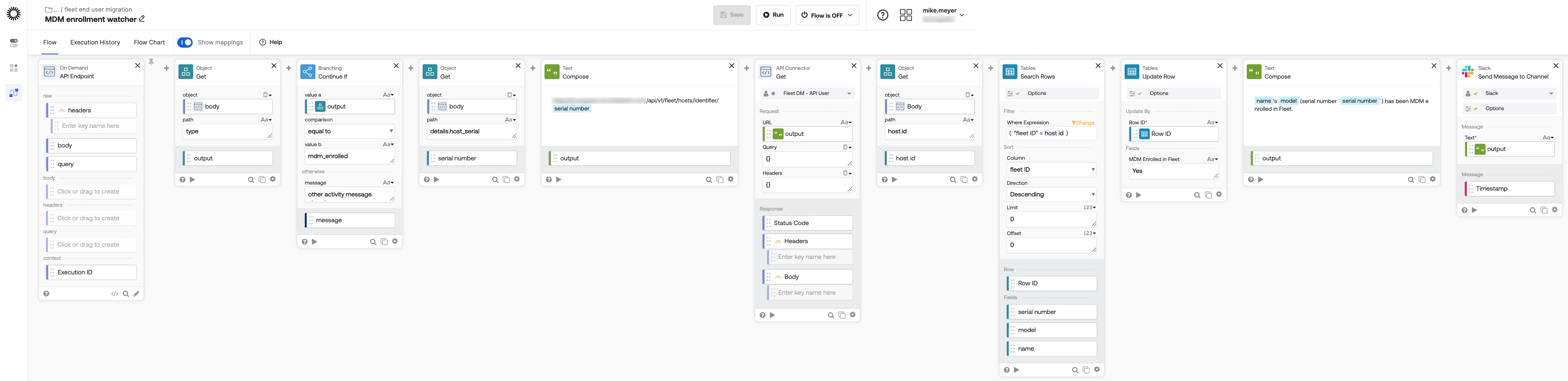
this was the confirmation step: the Jamf unenroll was in the queue, and now we knew Fleet had actually taken over.
host inventory collector
a scheduled flow that ran four times a day. for any table row that had a Fleet ID, it queried Fleet and pulled back the device’s team, OS version, FileVault status, and MDM server URL, writing all of it back into the table. this kept the inventory live throughout the migration without anyone having to manually check anything.
jamf removal
this one was a two-part operation spanning two separate flow runs, because script execution results aren’t available in real time.
the first run evaluated whether conditions were met, then triggered a specific script execution via the Fleet API, targeting the individual device. rather than waiting for a result that wasn’t coming, it recorded the execution ID returned by the Fleet API back into the table and moved on.
the second run came later in the nightly window. it picked up that execution ID, queried the Fleet API for the result of that specific script run, and evaluated the exit code. if it returned 0, it updated jamf_bits_removed in the table and the device was cleared to move forward.
host transfer
evaluated four conditions: unenrolled from Jamf, sitting in the staging team, not yet transferred, and enrolled in Fleet. if all four were true, it moved the device into the production workstations team and updated the table.
the staging step was intentional. newly migrated devices were parked there deliberately, keeping them away from production policies and configuration profiles until we were confident they were fully clear of Jamf. moving to the workstations team was the signal that a device was clean, compliant, and ready to have the full policy set applied.
enrollment remediation
this one was novel, because it handled reality. sometimes the Jamf unenrollment would get queued but not fully complete, leaving a device stuck in an in-between state where Jamf had told it to leave but Fleet couldn’t fully take over. this flow found those devices and triggered a script that ran a single command: jamf removeMdmProfile. just enough to nudge the process along. having a flow that could detect and self-heal stuck states automatically meant nobody was babysitting devices late at night.
migration completion check
evaluated whether a device had fully crossed the finish line: unenrolled from Jamf, in the production workstations team, jamf bits removed, team transfer confirmed. once all four conditions were true, it marked the device complete in the table and posted a Slack notification.
the missing connector
as of today, there is no official Okta Workflows connector for Fleet. the ecosystem is still growing, and it meant every API call we made during the migration had to be manually specified through Okta’s generic HTTP connector: endpoints, request structure, all of it, every time.
so after the migration wrapped, we started building a custom Fleet connector using Okta’s Connector Builder. the idea is simple: package the most common Fleet API calls as proper Workflow cards, with auth configured once at the connector level. Okta has a solid 7-part series on how to build one if you want to go down that path.
it’s still a work in progress, but the goal is the same as everything else in this post: less manual wiring, more reusable building blocks. every future Fleet-related flow should start from a real connector, not a pile of one-off HTTP cards.
beautifully anticlimactic
looking back, the whole thing was a little boring to watch unfold. nothing broke spectacularly. nobody stayed up all night. Okta Workflows let us build a system that did the migration for us: tracking state, handling failures, promoting devices automatically, and keeping the team informed the whole way. no-code, no drama. the system just… worked.
looking back, what i’m most proud of isn’t necessarily just the technical execution. it’s that we took a chance. we had a tight window, a tool we trusted, and a team willing to move fast and figure it out. the migration proved that when we needed to, we could. that kind of confidence doesn’t come from planning. it comes from doing.
i presented this work at Oktane 2025 as part of the Flowcase session, alongside other customers sharing how they’re putting Workflows to use. we walked away with the Workflows Future Builder Award. the full presentation is available on demand here if you want to see it in action.